

Overview
Mojura Architecture
The Mojura Architecture is a set of principles designed to enhance your development workflow by promoting scalability, maintainability, and readability.
Key Benefits:
- Scalability: By breaking down your application into smaller, manageable units, you can easily scale your project as it grows.
- Maintainability: The clear separation of concerns makes it easier to maintain and update your codebase, reducing the risk of bugs and improving overall code quality.
- Readability: The structured approach ensures that your code is organized and easy to understand, making it simpler for new developers to get up to speed.
"Mojura" (モジュラ) is the Japanese pronunciation for "module."
Mojura Architecture allows developers to work on different parts of the application simultaneously, facilitating easier collaboration, more efficient management of Git workflows, and reducing the likelihood of Git conflicts.
Mojura Package
The Mojura Package is a lightweight Laravel Package that implements the Mojura Architecture principles. This package is perfect for organizations and developers aiming to enhance their coding practices and create high-quality, robust Laravel applications.
Mojura Laravel Starter Kit
The Starter Kit provides a fully implemented backend solution based on the Mojura Architecture concepts, designed to speed up your development process. It includes robust features for authentication, authorization, user management, and security, making it a comprehensive starting point for building scalable applications.
Updated on October 20, 2025, 12:44 PM UTC
Concept Flow
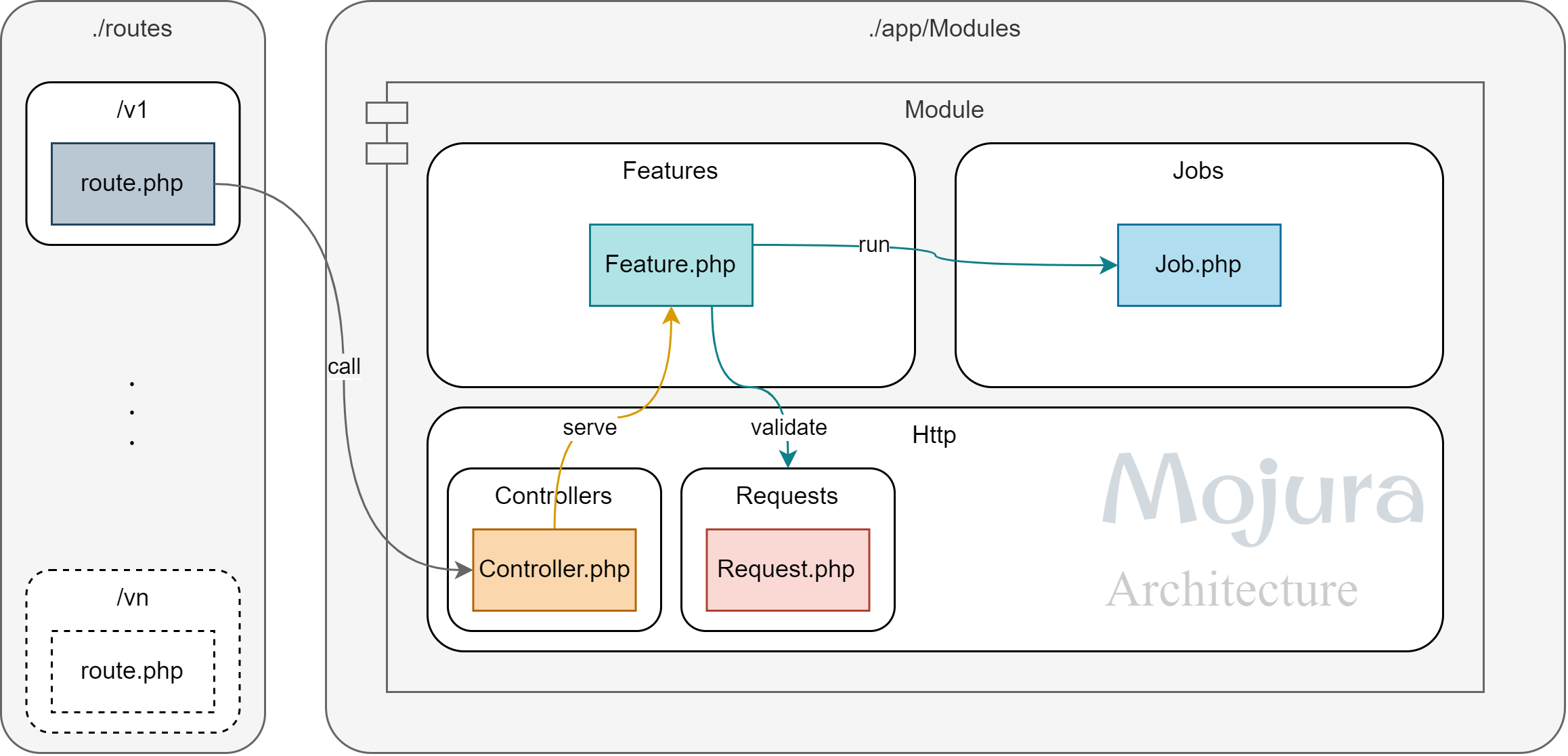
- Route: Calls Controller functions.
- Controller: Serves the Features and returns the Response received from the Feature to the Request.
- Feature:
- Validates the Request.
- Runs the Job by passing the request parameters.
- Collects Return Data from the Job.
- Prepares Response Data.
- Returns the HTTP Response to the Controller Method.
- Request: Authorizes the Request (Optional) and implements HTTP Request validating.
- Job: Does the actual work by implementing the business logic.
Principles
- Feature serves a Single Purpose: Favor creating as many of them as you wish rather than complicating a single one.
- Job executes a Single Responsibility: No job should do two responsibilities at a time; it will only get confusing the more you do it. Be aware that a Single Responsibility can involve multiple related functions as long as those functions are part of the same cohesive responsibility.
- Modules shouldn’t cross: Each module should be self-contained and should not perform tasks that belong to other modules.
- Apply Decoupling Techniques: Using Shared Utility and Helper Classes for Decoupling. It also enhances Code Reusability and Maintainability.
- Features shall not call other features: Run as many jobs as you like, but never a feature.
- Jobs shall not call other jobs: This is your business logic, keep it concise and organize by avoiding nesting and coupling hell.
- Write code that humans can read: Machines will run it nonetheless, it is us who will suffer.
Naming Convention
Consistent naming for files and classes is encouraged to practice for clarity and human readability.
- Module: [Subject]Module (Example:
UserModule) - Controller: [Subject]Controller (Example:
UserController) - Feature: [Operation][Subject]Feature (Example:
CreateUserFeature,ReadUserFeature,UpdateUserFeature) - Job: [Operation][Subject]Job (Example:
CreateUserJob,ReadUserJob,UpdateUserJob) - Request: [Operation][Subject]Request (Example:
CreateUserRequest,UpdateUserRequest)
Note: If you use the Mojura package installed
in your project and use Mojura commands to generate Controller/Feature/Request/Job files, please
use the [Subject][Operation] naming convention. Module folders are automatically
generated when you generate a Mojura Class.
Directory Structure
The Mojura Package automatically generates a structured set of directories and files for your module, including routes, controllers, requests, features, and job classes. This organized folder structure helps streamline the development process by providing a clear separation of concerns and encouraging best practices.
laravel-project/
├── app/
│   ├── Modules/
│   │   ├── YourModule1/
│   │   │   ├── Features/
│   │   │   ├── Http/
│   │   │   │   ├── Controllers/
│   │   │   │   └── Requests/
│   │   │   └── Jobs/
│   │   ├── YourModule2/
│   │   │   ├── Features/
│   │   │   ├── Http/
│   │   │   │   ├── Controllers/
│   │   │   │   └── Requests/
│   │   │   └── Jobs/
│   │   ├── YourModuleN/
│   │   │   ├── Features/
│   │   │   ├── Http/
│   │   │   │   ├── Controllers/
│   │   │   │   └── Requests/
│   │   │   └── Jobs/
├── routes/
│   ├── api/
│   └── web/
└── .env
Installation
To install the Mojura package into your Laravel 10+ application using Composer:
- Open Terminal or Command Prompt in your Laravel project directory.
- Run the following command to install the package:
composer require innoaya/mojuraConfiguration
Run the following command to publish the configuration file:
php artisan vendor:publish --tag=mojura-configFollowing is the contents of the default configuration file mojura.php in Laravel. You
are free to update the values as per your need.
return [
    /**
     * Register routes under routes/web and routes/api
     * by the service provider or not.
     */
    'enable_routes' => env('MOJURA_ENABLE_ROUTES', true),

    /**
     * Prefix for api routes
     */
    'api_routes_prefix' => env('MOJURA_API_ROUTES_PREFIX', ''),

    /**
     * Prefix for web routes
     */
    'web_routes_prefix' => env('MOJURA_WEB_ROUTES_PREFIX', 'app'),
];| Option | Default | Action |
|---|---|---|
enable_routes |
true | Should the package load the routes from routes/api & routes/web? |
api_routes_prefix |
'' | Prefix for registering the routes under routes/api |
web_routes_prefix |
'web' | Prefix for registering the routes under routes/web |
Run the following command to copy stub files to the resource folder:
php artisan vendor:publish --tag=mojura-stubsRoute
Command
You can generate a route by following command:
php artisan mojura:route [RouteFileName] [VersionDirectory] [--web] [--force]Example: php artisan mojura:route core v1 (Generated route file will be at routes/api/v1/core.php)
Parameters
[RouteFileName]: The name of the route you want to create (required).[VersionDirectory]: The version of the route or directory where the route will be created (required).[--web]: For web routes, generated route file will be stored in the web directory (optional).[--force]: If set, it will overwrite any existing request class with the same name (optional).
Calling A Controller Method
Route::group(['prefix' => '/v1/core'], function() {
    Route::post('/auth/login', [AuthController::class, 'login']);
});
Controller
Command
You can generate a controller by following command:
php artisan mojura:controller [Controller] [Module] [Directory] [--force]Example: php artisan mojura:controller Auth Core (Generated controller file will be at app/Modules/CoreModule/Http/Controllers/AuthController.php)
Parameters
[Controller]: The name of the controller you want to create (required).[Module]: The module where the controller will be created (required).[Directory]: The specific directory within the module where the controller will be placed (optional).[--force]: If set, it will overwrite any existing controller with the same name (optional).
Controller Class Implementation - Serving Features
The Controller must inherit the Mojura Controller InnoAya\Mojura\Core\Controller to work
with the serve method. Controller classes are automatically inherited when you generate a Controller
using the Mojura Command.
Call serve within the Controller method:
namespace App\Modules\CoreModule\Http\Controllers;

use InnoAya\Mojura\Core\Controller;
use App\Modules\CoreModule\Features\LoginUserFeature;

class AuthController extends Controller
{
    public function login()
    {
        return $this->serve(LoginUserFeature::class);
    }
}
Request
Command
You can generate a request by following command:
php artisan mojura:request [Request] [Module] [Directory] [--force]Example: php artisan mojura:request LoginUser Core (Generated Request file will be at app/Modules/CoreModule/Http/Requests/LoginUserRequest.php)
Parameters
[Request]: The name of the request class you want to create (required).[Module]: The module where the request class will be created (required).[Directory]: The specific directory within the module where the request class will be placed (optional).[--force]: If set, it will overwrite any existing request class with the same name (optional).
Request Class Implementation
<?php

namespace App\Modules\CoreModule\Http\Requests;

use InnoAya\Mojura\Core\Request;

class LoginRequest extends Request
{
    /**
     * Determine if the user is authorized to make this request.
     */
    public function authorize(): bool
    {
        return true;
    }

    /**
     * Get the validation rules that apply to the request.
     */
    public function rules(): array
    {
        return [
            'identifier' => 'string|required',
            'password' => 'string|required',
        ];
    }
}
Feature
Command
You can generate a feature by following command:
php artisan mojura:feature [Feature] [Module] [Directory] [--force]Example: php artisan mojura:feature LoginUser Core (Generated Feature file will be at app/Modules/CoreModule/Features/LoginUserFeature.php)
Parameters
[Feature]: The name of the feature class or file you want to create (required).[Module]: The module where the feature class will be created (required).[Directory]: The specific directory within the module where the feature class will be placed (optional).[--force]: If set, it will overwrite any existing feature class with the same name (optional).
Feature Class Implementation - Running Jobs
The Feature must inherit the Mojura Feature InnoAya\Mojura\Core\Feature to work with the
run or runInQueue method. Running jobs from a feature is straightforward using the run method.
<?php

namespace App\Modules\CoreModule\Features;

use InnoAya\Mojura\Core\Feature;
use App\Exceptions\UnauthorizedException;
use App\Helpers\JsonResponder;
use App\Modules\CoreModule\Http\Requests\LoginUserRequest;
use App\Modules\CoreModule\Jobs\LoginUserJob;
use Illuminate\Http\JsonResponse;
use Exception;

class LoginFeature extends Feature
{
    /**
     * Execute the feature.
     */
    public function handle(LoginUserRequest $request): JsonResponse
    {
        try {
            $data = $this->run(LoginUserJob::class, ['payload' => $request->validated()]);
            return JsonResponder::success('Logged in successfully', $data);
        } catch (UnauthorizedException $ue) {
            return JsonResponder::unauthorized($ue->getMessage());
        } catch (Exception $e) {
            return JsonResponder::internalServerError($e->getMessage());
        }
    }
}
Feature Class Implementation - Running Queue Jobs
Running queue jobs from a feature is straightforward using the runInQueue method. The Job that runs
inside the runInQueue method must inherit InnoAya\Mojura\Core\QueueableJob.
<?php

namespace App\Modules\CoreModule\Features;

use InnoAya\Mojura\Core\Feature;
use App\Exceptions\UnauthorizedException;
use App\Helpers\JsonResponder;
use App\Modules\CoreModule\Http\Requests\LoginUserRequest;
use App\Modules\CoreModule\Jobs\LoginUserJob;
use App\Modules\CoreModule\Jobs\NotifyUserLoginViaEmailJob;
use Illuminate\Http\JsonResponse;
use Exception;

class LoginFeature extends Feature
{
    /**
     * Execute the feature.
     */
    public function handle(LoginUserRequest $request): JsonResponse
    {
        try {
            $data = $this->run(LoginUserJob::class, ['payload' => $request->validated()]);

            $this->runInQueue(NotifyUserLoginViaEmailJob::class, ['payload' => $request->validated()]);

            return JsonResponder::success('Logged in successfully', $data);
        } catch (UnauthorizedException $ue) {
            return JsonResponder::unauthorized($ue->getMessage());
        } catch (Exception $e) {
            return JsonResponder::internalServerError($e->getMessage());
        }
    }
}
Job
Command
You can generate a job by following command:
php artisan mojura:job [Job] [Module] [Directory] [--force]Example: php artisan mojura:job LoginUserJob Core (Generated Job file will be at app/Modules/CoreModule/Jobs/LoginUserJob.php)
Parameters
[Job]: The name of the job class you want to create (required).[Module]: The module where the job class will be created (required).[Directory]: The specific directory within the module where the job class will be placed (optional).[--force]: If set, it will overwrite any existing job class with the same name (optional).
Job Class Implementation
<?php

namespace App\Modules\CoreModule\Jobs;

use InnoAya\Mojura\Core\Job;
use App\Enums\UserStatusEnum;
use App\Exceptions\UnauthorizedException;
use App\Models\User;
use Illuminate\Database\Eloquent\ModelNotFoundException;
use Illuminate\Support\Facades\Hash;

class LoginUserJob extends Job
{
    /**
     * Create a new job instance.
     *
     * @return void
     */
    public function __construct(private array $payload)
    {
    }

    /**
     * Execute the job.
     *
     * @return array
     */
    public function handle()
    {
        try {
            $user = User::with('role')
                ->where('status', UserStatusEnum::ACTIVE->value)
                ->where(function ($query) {
                    $query->where('username', $this->payload['identifier'])
                        ->orWhere('email', $this->payload['identifier'])
                        ->orWhere('mobile_number', $this->payload['identifier']);
                })
                ->firstOrFail();
        } catch (ModelNotFoundException $_) {
            throw new UnauthorizedException('Wrong Credentials');
        }

        if (Hash::check($this->payload['password'], $user->password)) {
            return [
                'access_token' => $user->createToken('Authentication Token')->plainTextToken,
                'user_data' => $user
            ];
        } else {
            throw new UnauthorizedException('Wrong Credentials');
        }
    }
}
Queue Job Class Implementation
<?php

namespace App\Modules\CoreModule\Jobs;

use InnoAya\Mojura\Core\QueueableJob;

class NotifyUserLoginViaEmailJob extends QueueableJob
{
    /**
     * Create a new queueable job instance.
     *
     * @return void
     */
    public function __construct(private array $payload)
    {
    }

    public function handle(): void
    {
        // notify to logged in user will be processed in the queue
    }
}
Acknowledgments
The journey towards scalable and maintainable backend architecture began for me in August 2022, when I assumed the role of Head of Technology at Onenex. It was during this time that I introduced the team to the principles of Lucid Architecture, inspired by its potential to streamline and enhance large-scale backend projects.
I would like to express my gratitude to Nay Thu Khant for developing the Lucid Architecture-based Laravel starter kit, which served as a foundation for our backend initiatives. My appreciation also extends to the other developers who contributed their ideas and suggestions, enriching our approach.
We implemented Lucid Architecture in three major projects, gaining invaluable experience through code reviews and addressing challenges in production environments. Building on these learnings, we created Next Laravel, an architecture and package tool that refined the core concepts of Lucid Architecture. This new framework offered clearer principles and a more efficient implementation, significantly reducing overhead.
I am especially thankful to Nay Thu Khant for his instrumental role in developing and implementing the Next Laravel package.
When we initiated the Tikkat Project, I led the development team in utilizing Next Laravel, creating a robust backend starter kit tailored to its architecture. Subsequently, I applied Next Laravel to another freelance digital platform project after my tenure at Onenex.
Drawing from my experience with both architectural frameworks, I sought to create an improved and universally accessible solution—one that embodies the core strengths of its predecessors while offering enhanced scalability and clarity. This vision gave rise to Mojura Architecture, a concept designed to simplify and scale backend development for a broader audience.